
Many small businesses are finally beginning to master using the anchor tag (a clickable link that takes you directly to a specific area of a page). This is a great way to improve navigation and give credit to outside sources that you quote in your content, not to mention the SEO benefits.
How the Anchor Tag Works
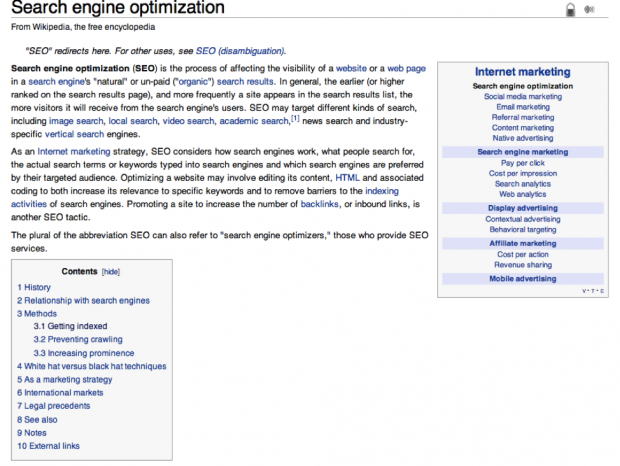
The anchor tag is essentially a tag that you can attach to a word or a phrase (exactly like you would a normal internal or external link), except it brings readers down to a different section of the page as opposed to another webpage. You’re essentially creating a unique URL within the same page when you use this tag. Consider the following example:

If you click on any of the headings in the “contents” box, it will jump you right down to that section without you ever having to leave the page or scroll down to find it.
The Benefits of Using the Anchor Tag
There are really three main benefits when it comes to using the anchor tag:
- No Scrolling. The biggest benefit to the anchor tag is not forcing your visitors to scroll down tons of information to find a particular section. This can get daunting, and depending on just how much content is on the page, it can be very difficult to find a certain section amidst all the content.
- Organization. This helps webmasters keep things in order. Instead of having to create several different webpages or splitting up a document, you can keep it all in one place.
- Search Engine Use. Google sometimes uses this tag to help send a user to a specific section of your webpage, which helps make things easier for users. This isn’t overly common, but Ann Smarty of My Blog Guest offered the following screenshot as an example on SEOChat:

The name anchor works great if you’re publishing a tutorial, a study or anything with a fairly large table of contents. Wikipedia is a great place to find examples of the anchor tag in use.
| Benefit | Description |
|---|---|
| No Scrolling | Anchor tags eliminate the need for extensive scrolling, making it easier for visitors to quickly access specific sections of a webpage, especially on content-heavy pages. |
| Organization | Anchor tags help webmasters maintain content organization within a single webpage rather than creating multiple pages or dividing content. This keeps information structured. |
| Search Engine Use | Google occasionally uses anchor tags to direct users to specific sections of a webpage. While not common, it can enhance user experience and improve SEO by offering precise results. |
How to Get Started Using the Anchor Tag
Fortunately, using the anchor tag is actually very simple. It’s all about using a series of different HTML codes which might remind you of the normal HTML linking tag you’re used to using. The steps are as follows:
- Open your text editor and figure out where you want to insert the name anchor tag. You can do this anywhere—a heading (most common), a word, a phrase, etc.
- Insert the anchor tag around the text you’re going to link (the same way you would any type of link). The code looks like this:
<a name=”title of the section”></a>
- Once you have created the anchor tag around the word, phrase, or heading that you would like, you will want to link to this URL in your content. The tag is similar to the coding you’re used to, except it is preceded by a # sign. You should open the HTML version of your content and insert the following tag:
<a href=”#title of the section”>text</a>
The anchor tag isn’t quite as popular as many other types of linking and is easy to miss if you’re a startup, but it’s a great way to help keep things easy for your visitor. It’s easy to implement and it’s never too late to get started.
Exploring Creative Uses of Anchor Tags
Anchor tags aren’t just for jumping within a single page. You can use them creatively to enhance your website’s functionality:
- Interactive Quizzes: Build interactive quizzes or surveys where users navigate to different sections based on their answers, all on the same page.
- Interactive Stories: Craft interactive storytelling experiences, allowing users to choose their path by clicking on anchor-linked options.
- FAQ Sections: Create FAQ pages with a list of questions at the top, each linking to the corresponding answers further down the page for easy navigation.
- Tabbed Content: Implement tabbed content sections on a single page, where each tab links to a specific section without requiring users to scroll.
- Product Features: Showcase product features with anchor tags, enabling users to click on a feature to learn more without leaving the page.
- Multi-Step Forms: Build multi-step forms or applications, with each section on the same page linked through anchor tags, simplifying the submission process.
| Creative Use | Description |
|---|---|
| Interactive Quizzes | Create engaging quizzes or surveys where users navigate to different sections of the same page based on their answers, providing an interactive experience. |
| Interactive Stories | Develop interactive storytelling experiences, allowing users to choose their own adventure by clicking on anchor-linked options within the same page. |
| FAQ Sections | Design FAQ pages with a list of questions at the top, each linked to the corresponding answers further down the page, offering convenient navigation for users. |
| Tabbed Content | Implement tabbed content sections on a single page, with each tab linking to a specific section, simplifying navigation and reducing the need for excessive scrolling. |
| Product Features | Showcase product features using anchor tags, allowing users to click on a feature for more details without leaving the current page, enhancing user experience. |
| Multi-Step Forms | Build multi-step forms or applications, utilizing anchor tags to link each section on the same page, streamlining the submission process for users. |
Best Practices for Anchor Tag Usage
When using anchor tags on your website, consider the following best practices to ensure an optimal user experience:

- Clear Labeling: Use descriptive and concise labels for your anchor tags so that users understand where each link will take them within the page.
- Responsive Design: Ensure that your anchor tags work seamlessly on both desktop and mobile devices, as many users browse websites on smartphones and tablets.
- Accessibility: Implement accessible design practices, such as providing alternative text for anchor links, to make your content usable for people with disabilities.
- Consistent Styling: Maintain consistent styling for your anchor links to make them visually recognizable. Users should easily identify clickable elements.
- Testing: Regularly test the functionality of your anchor tags to ensure they work as intended, especially after making updates to your website.
- SEO-Friendly: While anchor tags primarily enhance user experience, they can also benefit SEO. Ensure that your anchor-linked content is relevant to the page’s topic and keywords.
- Avoid Overuse: Don’t clutter your pages with too many anchor links. Use them sparingly to guide users to essential content.
- Back to Top Button: For longer pages, consider adding a “Back to Top” button that allows users to return to the page’s beginning quickly.
- User Guidance: Provide brief instructions or tooltips near anchor links, especially if your page has complex interactions.
Frequently Asked Questions (FAQs)
Welcome to our FAQs section, where we’ll address common questions about anchor tags and how to use them effectively on your website. Anchor tags, also known as named anchors or page anchors, are HTML elements used for creating links within a webpage. They allow users to jump to specific sections of the same page without the need for extensive scrolling. Let’s dive into the details.
What Are Anchor Tags?
Anchor tags, often represented by the <a> element in HTML, are used to create hyperlinks that take users to different sections of the same webpage. These sections are identified by anchor names or IDs. Anchor tags are a valuable tool for improving user experience by allowing quick navigation to specific content within a lengthy webpage.
How Do Anchor Tags Work?
Anchor tags consist of two parts: the anchor name (or ID) and the hyperlink itself. Here’s how they work:
- Setting an Anchor Name: To create an anchor, you need to define an anchor name or ID within your HTML code. For example:html
<a name="section1"></a>
This anchor name, “section1,” serves as a reference point for linking.
- Creating the Hyperlink: To create a link to the anchor, you use the anchor name in the
hrefattribute of another anchor tag. For example:html<a href="#section1">Jump to Section 1</a>
When users click this link, they will be taken to the “section1” anchor on the same page.
Why Should I Use Anchor Tags?
Anchor tags offer several benefits:
- Improved Navigation: Users can quickly jump to relevant content without having to scroll extensively.
- Enhanced User Experience: Long webpages become more user-friendly with anchor tags, as users can find information effortlessly.
- Table of Contents: Anchor tags can create a dynamic table of contents for lengthy articles or guides.
- SEO Benefits: Well-structured anchor-linked content can improve SEO by creating clear content hierarchies.
Can Anchor Tags Be Used on Mobile Devices?
Yes, anchor tags are compatible with mobile devices. When correctly implemented, they provide seamless navigation on smartphones and tablets, enhancing the mobile user experience. Responsive web design ensures that anchor tags work effectively on various screen sizes.
Are There Best Practices for Using Anchor Tags?
Certainly! To make the most of anchor tags, consider these best practices:
- Clear Labeling: Use descriptive anchor labels to guide users effectively.
- Responsive Design: Ensure your anchor tags work well on both desktop and mobile devices.
- Accessibility: Implement accessibility features to make anchor-linked content usable for everyone.
- Consistent Styling: Maintain a consistent visual style for anchor links.
- Testing: Regularly test anchor links to verify their functionality.
- SEO-Friendly: Optimize anchor-linked content for SEO by aligning it with your page’s topic and keywords.
- Avoid Overuse: Don’t clutter your page with too many anchor links; use them judiciously.
- Back to Top Button: Consider adding a “Back to Top” button for longer pages.
- User Guidance: Provide tooltips or brief instructions near anchor links, especially on pages with complex interactions.
How Can Anchor Tags Benefit SEO?
While anchor tags primarily enhance user experience, they can indirectly benefit SEO. Anchor-linked content can improve SEO by:
- Organizing Content: Anchor tags help structure content hierarchies, making it more accessible to search engines.
- Reducing Bounce Rate: Users are more likely to stay engaged and explore your content when navigation is easy, potentially reducing bounce rates.
- Enhancing User Signals: Positive user experiences, facilitated by anchor tags, can send positive signals to search engines.
- Targeting Keywords: Anchor-linked content can be optimized for specific keywords, improving search engine visibility.
Can I Use Anchor Tags in Combination with Other HTML Elements?
Yes, anchor tags can be combined with various HTML elements to create versatile user experiences. You can use them alongside headings, lists, images, and more to create comprehensive content structures. Experimenting with different combinations can lead to creative and engaging webpage designs.
Are There Examples of Anchor Tags in Action?
Absolutely! Anchor tags are commonly used in various web contexts. Some examples include:
- Long Articles: Anchor tags help users navigate lengthy articles by providing a table of contents.
- Online Documentation: Technical documentation often uses anchor tags to allow users to jump to specific sections.
- FAQ Pages: FAQ pages frequently employ anchor tags to help users find answers quickly.
- Tutorial Websites: Tutorials use anchor tags to create step-by-step navigation.
- Product Pages: E-commerce websites use anchor tags to facilitate product information access.
How Do I Get Started with Anchor Tags?
Getting started with anchor tags is straightforward:
- Identify the content sections you want to link to.
- Create anchor names or IDs for those sections using the
<a>tag with thenameattribute. - Create hyperlinks using anchor tags (
<a>) with thehrefattribute referencing the anchor names. - Test your anchor tags to ensure they navigate correctly.
Are Anchor Tags Still Relevant in Modern Web Design?
Absolutely! Anchor tags remain relevant and valuable in modern web design. They contribute to a positive user experience, especially on lengthy pages or content-rich websites. By incorporating anchor tags, you can enhance navigation, improve SEO, and keep users engaged with your content.
Have you used the anchor tag in the past? Did you find it successful?
Photo Credit: the-seo-site.com
This article, “What is the Anchor Tag and When Should You Use it?” was first published on Small Business Trends
Originally published at Small Business Trends