

- TL;DR: Enterprise generative AI tools are advanced software platforms designed to automate and enhance marketing, sales, and customer service at scale.
- The best tools integrate with your CRM, unify customer data, and support secure, governed workflows.
- To choose the right solution, focus on proven use cases, integration depth, governance controls, and measurable ROI. Start with a clear rollout plan, align teams, and use a selection matrix to compare vendors.
Generative AI tools like ChatGPT have changed individual work, but using them in a company causes many challenges. Teams copy-paste customer data into external interfaces, but the outputs lack context from your CRM, and there’s no audit trail when something goes wrong. Security teams raise red flags, compliance officers demand answers, and leadership questions whether the technology is ready for production use.
![Access Now: Free AI Content Creator [Free Tool]](https://no-cache.hubspot.com/cta/default/53/7dfb2d37-0fc3-4e9d-b003-143f04d73acf.png)
The gap between consumer AI and enterprise AI isn‘t just about features. It’s about integration, governance, data sovereignty, and the ability to prove measurable business outcomes. Enterprise generative AI tools help by integrating AI into your workflows and systems, allowing safe large-scale AI deployment.
This guide provides production-proven use cases, a vendor evaluation matrix, a practical rollout plan, and a governance checklist. We‘ll even show how platforms like HubSpot’s Breeze AI integrate these capabilities into marketing, sales, and service workflows.
Table of Contents
Enterprise Gen AI Use Cases
Enterprise generative AI tools deliver measurable value when applied to specific, repeatable workflows. Here’s how leading organizations deploy these tools across marketing, sales, and customer service.
Marketing Use Cases
1. Content Generation at Scale
Marketing teams use generative AI to create blog posts, social media content, email campaigns, and landing page copy that fits the brand voice and targets different audience segments. The difference between consumer and enterprise tools shows up in brand consistency controls, approval workflows, and the ability to ground content in your actual customer data.
What I like: Tools that connect to your CRM can use real customer interactions, sales call pain points, and product usage patterns to create relevant content.
2. Personalization Engines
Rather than creating one-size-fits-all campaigns, generative AI analyzes customer behavior, engagement history, and firmographic data to generate personalized messaging, subject lines, and calls-to-action for each recipient. This moves beyond simple merge tags to genuinely adaptive content.
3. SEO and Search Optimization
Enterprise AI tools analyze search intent, identify content gaps, and generate SEO-optimized content that addresses specific queries your target accounts are asking. They can also optimize existing content for better search visibility and suggest internal linking strategies.
Pro tip: AI workflow automation is more effective when generative AI tools can trigger actions based on content performance and adjust campaigns according to engagement data.
4. Campaign Analysis and Reporting
Instead of manually pulling data from multiple platforms, generative AI synthesizes campaign performance across channels, identifies patterns, and generates executive summaries with actionable recommendations. This goes beyond basic merge tags to truly adaptive content.
Sales Use Cases
5. Intelligent Email Sequencing
Sales teams use AI to craft personalized outreach sequences that reference specific pain points, recent company news, and mutual connections. Enterprise tools ground these emails in CRM data, ensuring accuracy and relevance rather than generic templates.

Best for: Teams that need to personalize outreach at scale without sacrificing the quality that comes from manual research.
6. Meeting Preparation and Briefings
Before every call, generative AI compiles account history, recent interactions, open opportunities, and relevant market intelligence into a concise briefing. This eliminates prep work and ensures reps enter conversations fully informed.
7. Proposal and RFP Responses
Writing proposals typically requires pulling information from multiple sources, past proposals, product documentation, and case studies. Generative AI assembles customized proposals by analyzing RFP requirements and matching them to your capabilities, significantly reducing turnaround time.
What we like: Tools that maintain a knowledge base of past successful proposals and can identify winning patterns in your responses.
8. Call Transcription and Analysis
Enterprise AI tools transcribe sales calls, identify key moments, extract action items, and update CRM records automatically. They also analyze conversation patterns to identify what top performers do differently and surface coaching opportunities.
Pro tip: Generative AI in sales works best when integrated directly into the tools reps already use, eliminating context switching and increasing adoption.
9. Deal Intelligence and Forecasting
By analyzing pipeline data, win/loss patterns, and deal progression, generative AI provides early warning signals about at-risk deals and suggests specific actions to move opportunities forward.
Customer Service Use Cases
10. Knowledge Base Automation
Rather than manually creating and maintaining help articles, generative AI analyzes support tickets, identifies common questions, and generates comprehensive knowledge base content. It also keeps articles current by suggesting updates based on recent ticket trends.
11. Intelligent Ticket Routing and Triage
AI analyzes incoming support requests, extracts key information, determines urgency, and routes tickets to the appropriate team or agent. This reduces response times and ensures customers reach the right expert faster.
12. Response Drafting and Suggested Replies
Service agents receive AI-generated response drafts based on ticket content, customer history, and knowledge base articles. Agents can accept, edit, or regenerate suggestions, dramatically reducing handle time while maintaining quality.
What we like: Systems that learn from agent edits to improve future suggestions, creating a continuous improvement loop.
13. Sentiment Analysis and Escalation
Generative AI monitors customer interactions across channels, identifies frustration or churn risk, and automatically escalates critical issues to senior support staff or account managers before small problems become major incidents.
14. Self-service Chatbots and Virtual Agents
Modern AI-powered chatbots move beyond rigid decision trees to understand natural language, access your knowledge base and CRM, and resolve common issues without human intervention. They escalate to human agents when needed, passing along full context.
Pro tip: The most effective implementations of generative AI and customer centricity use unified customer data to ensure AI responses are informed by purchase history, support history, and account status.
15. Customer Feedback Synthesis
Instead of reading hundreds of survey responses, chat transcripts, and reviews manually, generative AI identifies themes, sentiment trends, and actionable insights that inform product and service improvements.
How to Choose the Right Enterprise Gen AI Tool
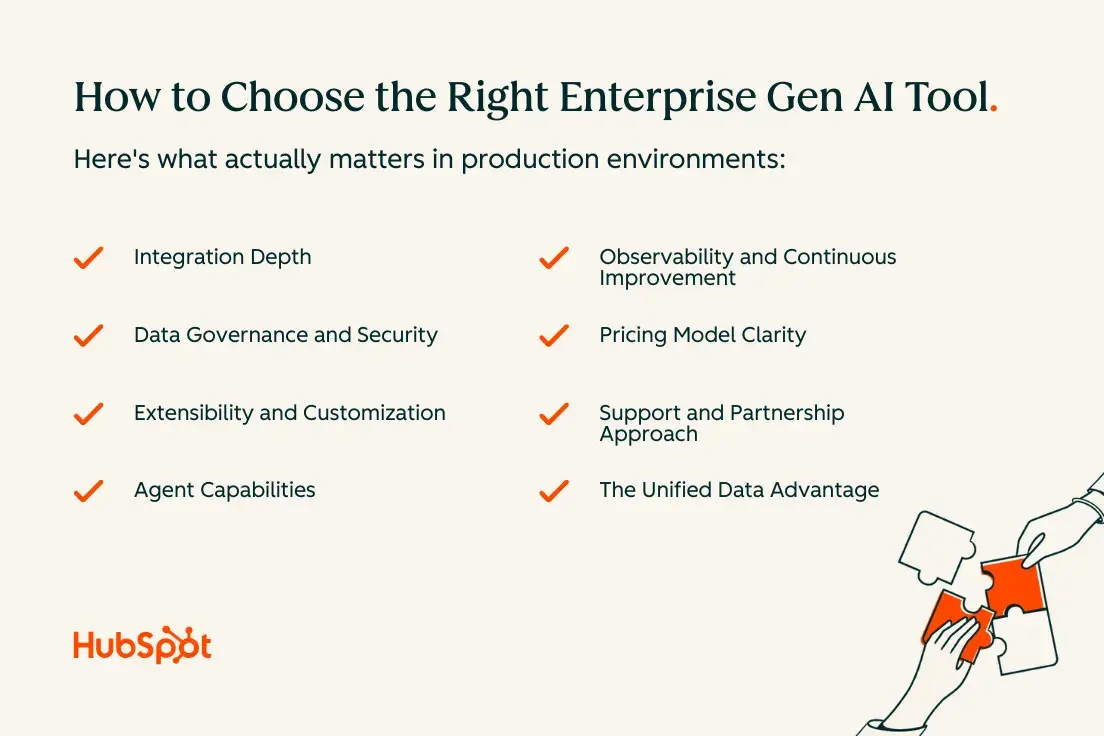
Selecting the right enterprise generative AI platform requires evaluating capabilities beyond impressive demos. Here’s what actually matters in production environments.
Integration Depth
Enterprise generative AI tools automate and enhance marketing, sales, and customer service workflows most effectively when they connect natively to your core systems. Surface-level integrations via API create maintenance overhead and data sync issues. Look for tools that embed directly into your CRM, marketing automation platform, and customer service software.
Why this matters: When AI tools access unified customer data in real-time, they generate more accurate outputs, eliminate manual data transfer, and reduce security risks. A CRM-first approach means every AI interaction is grounded in actual customer context, not generic training data.
Data Governance and Security
Best enterprise generative AI tools integrate with CRM and core business systems while maintaining strict data controls. Evaluate how tools handle:
Data residency and sovereignty: Where is your data processed and stored? Can you specify geographic constraints to meet regulatory requirements?
Access controls and permissions: Does the tool respect your existing role-based access controls, or does it create a new permission system that requires separate management?
Audit trails and observability: Can you track what data was accessed, what prompts were used, and what outputs were generated? This becomes critical for compliance and troubleshooting.
Data retention and deletion: How long are prompts and outputs stored? Can you enforce retention policies consistent with your existing data governance framework?
Pro tip: Governance controls mitigate risk and ensure accuracy in generative AI outputs by creating layers of verification before information reaches customers or makes decisions.
Extensibility and Customization
Every enterprise has unique workflows, terminology, and business logic. The right platform allows you to:
- Fine-tune models on your data to improve accuracy for domain-specific tasks
- Create custom prompts and workflows that encode your business processes
- Build proprietary agents that combine multiple AI capabilities
- Integrate with specialized tools and data sources specific to your industry
Agent Capabilities
Understanding when to use different types of AI assistance matters. Breeze Copilot assists with in-flow AI guidance and automation across teams by providing suggestions and drafts that humans review. Autonomous agents handle end-to-end processes with minimal supervision, like automatically responding to common support tickets or enriching lead data.
The best platforms support both copilot and agent modes, letting you match the level of automation to task complexity and risk tolerance. They also provide orchestration capabilities that let multiple specialized agents work together on complex workflows.
Observability and Continuous Improvement
Production AI systems require monitoring beyond traditional software metrics. Look for platforms that provide:
- Confidence scores on AI-generated outputs
- Feedback mechanisms that let users flag inaccurate or unhelpful responses
- Analytics on how AI suggestions are being accepted, edited, or rejected
- A/B testing capabilities to compare different prompt strategies or model configurations
This observability enables continuous improvement and helps you identify where AI adds value versus where it creates friction.
Pricing Model Clarity
Enterprise generative AI pricing models vary dramatically across vendors. Common structures include:
Per-user pricing: Fixed cost per seat, regardless of usage intensity. Predictable but potentially expensive if only some users leverage AI heavily.
Usage-based pricing: Charges based on API calls, tokens processed, or outputs generated. Scales with actual consumption but requires monitoring to prevent runaway costs.
Hybrid models: Combines base platform fees with usage-based components, balancing predictability and flexibility.
What to watch for: Hidden costs for training, customization, premium models, or data storage. Ask vendors for representative customer consumption patterns to inform your forecasts.
Support and Partnership Approach
Enterprise AI deployments succeed or fail based on the vendor’s ability to support change management, provide technical guidance, and adapt to your evolving needs. Evaluate:
- Availability of technical account management and implementation specialists
- Quality of documentation, training resources, and certification programs
- Responsiveness of support channels and issue resolution timeframes
- Vendor’s product roadmap and commitment to enterprise features
The Unified Data Advantage
Unified customer data reduces implementation risk and time to value by eliminating the need to replicate information across systems or build complex data pipelines before AI can be useful. When your generative AI platform sits on top of your CRM rather than alongside it, you get:
Faster time to value: No lengthy data migration or integration project required before seeing results. AI works with your existing data from day one.
Higher accuracy: AI outputs are grounded in actual customer records, reducing hallucinations and irrelevant suggestions.
Simpler governance: Data access controls, retention policies, and audit requirements are already in place. AI respects existing governance rather than requiring new frameworks.
Better user adoption: Teams don’t need to learn new interfaces or switch between systems. AI assistance appears in their existing workflows.
HubSpot Smart CRM serves as a unified data layer for enterprise AI tools, connecting marketing, sales, and service data in one platform that Breeze AI can access securely.
Here are proven platforms organized by primary use case, with a focus on production-ready capabilities and enterprise-grade features.
Here are proven platforms organized by primary use case, with a focus on production-ready capabilities and enterprise-grade features.
Tool | Primary Use Case | Key Strengths | Best For | Integration Approach |
HubSpot Breeze AI | Marketing, Sales, Service | Native CRM integration, unified customer data, Claude connector | Teams wanting AI embedded in existing workflows without separate vendors | Native to HubSpot platform |
Jasper | Marketing Content | Brand voice consistency, approval workflows, content templates | Large marketing teams producing high-volume content across channels | API integrations |
Copy.ai | Marketing & Sales Copy | Campaign automation, multi-channel generation | Demand gen teams running integrated campaigns | API integrations |
Gong | Sales Intelligence | Conversation analysis, deal risk identification, rep coaching | Sales orgs focused on call analysis and performance optimization | Integrates with major CRMs |
Outreach | Sales Engagement | Sequence optimization, predictive analytics, email generation | Inside sales running high-volume outbound campaigns | Native sales engagement platform |
Intercom | Customer Service | AI chatbot (Fin), workflow automation, knowledge base integration | Teams wanting automated resolution for routine inquiries | Standalone with integrations |
Zendesk AI | Customer Service | Intelligent triage, sentiment analysis, multi-channel support | Large support orgs with complex routing needs | Native to Zendesk platform |
Anthropic Claude | Cross-Functional | Complex reasoning, long-context analysis, high accuracy | Knowledge work requiring nuanced judgment and document analysis | API access |
Microsoft Copilot | Productivity | Office 365 integration, Microsoft Graph access | Enterprises invested in Microsoft 365 ecosystem | Native to Microsoft apps |
Google Gemini | Productivity | Google Workspace integration, collaborative AI | Organizations using Google Workspace | Native to Google apps |
Marketing Tools
1. HubSpot Breeze AI
Breeze integrates directly into HubSpot’s Marketing Hub, providing AI capabilities across content creation, campaign optimization, and analytics without leaving your CRM.
It serves many functions, like the AI Email Writer, which generates personalized campaign content based on contact properties and engagement history. Breeze Copilot appears throughout the platform to suggest next actions, draft social posts, and optimize landing pages.
What I like: Native integration with HubSpot Smart CRM means all AI suggestions are grounded in unified customer data, reducing generic outputs. The Claude connector brings advanced reasoning capabilities to complex marketing tasks.
HubSpot Breeze AI is best for: Teams already using HubSpot who want to add AI capabilities without integrating separate tools or managing additional vendors.
2. Jasper
Jasper specializes in brand-compliant content generation at scale, with features for maintaining consistent voice across large content teams. The platform includes brand guidelines enforcement, approval workflows, and templates for common marketing assets.
Best for: Large marketing teams producing high volumes of content across multiple channels who need strong brand controls.
3. Copy.ai
Copy.ai focuses on sales and marketing copy with workflow automation features. The platform includes campaign builders that generate complete multi-channel campaigns from a single brief.
Best for: Demand generation teams running integrated campaigns across email, social, and paid channels.
Sales Tools
4. Breeze Prospecting Agent
.webp?width=1400&height=1051&name=Breeze%20-%20Company%20Research%20(1).webp)
Breeze assists sales teams with email generation, meeting prep, call transcription, and deal insights. The AI analyzes conversation patterns, suggests next steps, and automatically updates CRM records based on interactions. Sales reps access these capabilities directly in their inbox, on calls, and within deal records.
What I like: Tight integration with Sales Hub means AI suggestions consider deal stage, contact role, account history, and team best practices automatically.
Breeze Prospecting Agent is best for: B2B sales teams who want AI assistance that improves with use by learning from your specific sales motions and successful patterns.
5. Gong
Gong analyzes sales conversations across calls, emails, and meetings to identify deal risks, coach reps, and surface winning behaviors. The platform transcribes calls, extracts key moments, and tracks how opportunities progress based on conversation content.
Best for: Sales organizations focused on conversation intelligence and using call analysis to drive rep performance.
6. Outreach
Outreach embeds AI throughout its sales engagement platform, providing sequence suggestions, email generation, and predictive analytics about which outreach strategies work best for different personas and segments.
Best for: Inside sales teams running high-volume outbound campaigns who need data-driven insights into what messaging resonates.
Customer Service Tools
7. Breeze Customer Agent
Breeze powers the Service Hub knowledge base by auto-generating help articles from ticket patterns, suggesting content updates, and drafting agent responses based on previous resolutions. The AI chatbot handles common inquiries by accessing your knowledge base and customer history, escalating complex issues to human agents with full context.
What I like: Service Hub’s knowledge base works as a single source of truth that both AI and human agents reference, ensuring consistent responses across channels.
Best for: Service teams looking to scale support without proportionally scaling headcount, using AI to handle routine inquiries while humans focus on complex issues.
8. Intercom
Intercom’s Fin AI chatbot uses GPT-4 to answer customer questions by referencing your knowledge base, past conversations, and help documentation. The platform includes workflow automation and hands-off resolution for common support scenarios.
Best for: Teams wanting a powerful AI chatbot that handles a high percentage of routine inquiries without extensive training or maintenance.
9. Zendesk AI
Zendesk integrates AI across ticketing, knowledge management, and agent assistance. Features include intelligent triage, sentiment analysis, response suggestions, and automated article generation based on ticket trends.
Best for: Large support organizations with complex ticket routing needs and multiple support channels requiring unified AI capabilities.
Cross-Functional Platforms
10. Anthropic Claude
Claude excels at complex reasoning tasks, long-context understanding, and maintaining accuracy across extended conversations. Enterprises use Claude for tasks requiring nuanced judgment, such as analyzing contracts, synthesizing research, or drafting detailed technical documentation.
What I like: Strong instruction following and lower hallucination rates make Claude particularly valuable for tasks where accuracy is non-negotiable. The extended context window handles lengthy documents without summarization loss.
Best for: Knowledge work requiring deep analysis, complex reasoning, or processing lengthy documents where accuracy and thoughtfulness matter more than speed.
11. Microsoft Copilot
Microsoft Copilot embeds across the Office 365 ecosystem, providing AI assistance in Word, Excel, PowerPoint, Outlook, and Teams. The platform accesses your Microsoft Graph data to ground responses in your organization’s documents and communications.
Best for: Enterprises heavily invested in Microsoft 365 who want AI capabilities embedded in their existing productivity suite.
12. Google Gemini for Enterprise
Gemini integrates across Google Workspace, providing AI capabilities in Docs, Sheets, Gmail, and Meet. The enterprise version includes data governance controls, admin oversight, and the ability to ground responses in your organization’s Google Drive content.
Best for: Organizations using Google Workspace as their primary productivity platform who need enterprise controls around AI usage.
How to Integrate a Gen AI Platform With Your Enterprise Tech Stack
Successful integration requires a methodical approach that balances speed with stability. Here’s how to deploy enterprise generative AI tools without disrupting existing workflows.
1. Audit your current data architecture.
Before integrating any AI platform, map where your customer data lives, how it flows between systems, and what quality issues exist. Identify your systems of record for customer information, understand data duplication and inconsistency issues, document integration points and data flows, and assess data quality and completeness in each system.
What if your data is fragmented across different tools? Start with a CRM-first data alignment approach rather than attempting to integrate everything at once. Focus on ensuring your CRM contains authoritative customer records, then connect AI tools to that single source of truth. This pragmatic path delivers incremental wins while avoiding the delays of large-scale data consolidation projects.
2. Define your integration approach.
Choose between native integrations provided by your AI platform, custom API integrations for proprietary systems or unique requirements, middleware solutions for connecting disparate systems, and embedded AI where the platform itself includes AI capabilities (like Breeze within HubSpot).
Native integrations typically offer the deepest functionality with the least maintenance overhead. Embedded AI eliminates integration entirely by building AI into the platforms you already use, which is why platforms like HubSpot that combine CRM, marketing, sales, and service capabilities with native AI deliver faster time to value.
3. Establish data governance before deployment.
Set clear policies for what data AI systems can access, how outputs should be reviewed before reaching customers, and who can use different AI capabilities. Implement technical controls including role-based access that mirrors existing CRM permissions, data masking for sensitive fields like payment information, audit logging for all AI interactions, and retention policies for prompts and outputs.
These governance controls should be in place before rolling out AI to production users, not added afterward.
4. Start with a focused pilot.
Rather than attempting organization-wide deployment, begin with a single high-value use case and a small team. Choose a workflow where AI can deliver measurable improvement, success metrics are clear, and the team is eager to adopt new tools.
Run the pilot for 30-60 days, gathering quantitative metrics on efficiency gains, quality improvements, and user satisfaction alongside qualitative feedback about what works and what creates friction.
5. Build integration patterns that scale.
As you expand from pilot to broader deployment, establish reusable patterns for common integration needs. Document how to connect AI tools to different data sources, create standardized prompt templates for recurring tasks, build feedback loops that improve AI performance over time, and establish monitoring dashboards that track AI usage and outcomes.
These patterns accelerate subsequent rollouts and ensure consistency across teams.
6. Train teams on prompt engineering.
The quality of AI outputs depends heavily on input quality. Provide training on crafting effective prompts, understanding when to provide more context versus letting AI infer, recognizing and flagging AI hallucinations or errors, and editing AI outputs rather than accepting them wholesale.
Teams that understand how to work effectively with AI extract far more value than those who view it as a black box that either works or doesn’t.
7. Establish continuous improvement processes.
AI platforms improve with use, but only if you create feedback mechanisms that capture learning. Implement regular reviews of AI output quality, analysis of which suggestions users accept versus reject, A/B testing of different prompt strategies, and model fine-tuning based on your specific use cases.
The most successful enterprises treat AI integration as an ongoing optimization process rather than a one-time implementation project.
Frequently Asked Questions About Enterprise Generative AI Tools
How do we prevent hallucinations without slowing down teams?
The solution involves layered controls rather than a single mechanism.
Trusted source grounding: Configure AI tools to prioritize your knowledge base, CRM data, and verified documentation. When AI pulls from authoritative sources you control, hallucination risk drops significantly.
Prompt standards: Establish templates for common tasks that instruct AI to admit uncertainty, request clarification when needed, and cite sources for factual claims.
Graduated review levels: Match review requirements to risk. Internal summaries need no review, customer-facing content gets agent review, and high-risk communications require specialist approval.
Agent guardrails: Implement rules that prevent autonomous agents from taking actions above certain risk thresholds without human approval, such as spending limits or customer communication boundaries.
Continuous evaluation: Regularly sample AI outputs and track accuracy over time. This identifies where additional controls are needed without slowing every workflow.
The key insight: different workflows tolerate different error rates. Design governance to match actual risk rather than applying uniform restrictions everywhere.
How should we budget for enterprise generative AI?
Enterprise generative AI pricing models create budgeting challenges because consumption patterns are unpredictable initially.
Understand your pricing model: Clarify whether you’re paying per user, per usage (API calls, tokens, outputs), or hybrid. Ask vendors for representative consumption patterns from similar customers.
Start with a pilot budget: Allocate budget for a 60-90 day pilot with defined scope. Measure actual consumption, extrapolate based on planned rollout, and build in a buffer for higher adoption.
Implement monitoring: Set up dashboards tracking consumption against budget in real-time with alerts when usage exceeds thresholds. This prevents surprise costs and identifies optimization opportunities.
Forecast with governance: Your governance controls directly impact costs. Systems requiring human review will consume less than autonomous agents operating continuously.
Consider opportunity cost: Compare AI costs against the labor cost of performing tasks manually. If AI reduces a two-hour process to fifteen minutes, the productivity gain typically far exceeds usage costs.
Most enterprises find that AI costs represent a small fraction of efficiency gains, but the shift to consumption-based pricing requires different budgeting processes.
When should we use a copilot versus an autonomous agent?
Use copilots when:
- Tasks require human judgment that’s difficult to encode
- Errors would damage relationships or create compliance issues
- Teams are learning and AI serves as training support
- Output quality benefits from human expertise
- Regulations mandate human review
Use autonomous agents when:
- Tasks are highly repetitive with clear success criteria
- Volume exceeds human capacity
- Speed matters more than perfection
- The process is well-documented with minimal edge cases
- You have sufficient data to measure agent performance
Examples in practice:
Copilot: Drafting sales emails where reps review and personalize before sending. AI provides structure, humans control tone and timing.
Agent: Automatically enriching leads with firmographic data. The process is mechanical, errors are non-critical, and review would create bottlenecks.
Copilot: Generating knowledge base articles where experts review for accuracy before publishing.
Agent: Routing support tickets based on content analysis, with confidence scores triggering human review for ambiguous cases.
Many enterprises start with copilots to build trust, then gradually shift appropriate workflows to autonomous agents as confidence grows.
How long does a typical enterprise rollout take?
Enterprise generative AI rollouts follow predictable phases, though timelines vary based on complexity and governance needs.
Phase 1: Assessment and Planning (4-8 weeks)
Define success metrics, audit data architecture, establish governance framework, select platform, and identify pilot teams.
Gating criteria: Clear use case with metrics, executive alignment, governance documented.
Phase 2: Pilot Implementation (6-12 weeks)
Configure integrations, set up access controls, train pilot team, launch with monitoring, and gather feedback.
Gating criteria: Measurable value demonstrated, user satisfaction above threshold, no critical security issues.
Phase 3: Iterative Expansion (3-6 months)
Roll out in waves, refine workflows based on learnings, expand integrations, and build training programs.
Gating criteria: Previous wave shows sustained value, training scaled, support team ready.
Phase 4: Organization-Wide Deployment (6-12 months from start)
Deploy to all teams, establish AI governance centers of excellence, and measure business impact.
What extends timelines:
Data issues: Fragmented customer data or poor quality adds 8-16 weeks if not addressed upfront.
Governance complexity: Heavily regulated industries require extensive controls, adding 4-8 weeks.
Integration challenges: Legacy systems or complex customizations can add months.
Change management: Resistance or inadequate training slows adoption significantly.
Organizations that treat deployment as change management rather than purely technology see faster adoption, even if initial rollout takes longer.
What if our data is fragmented across tools and platforms?
Data fragmentation is the norm for enterprises. Customer information lives in CRM, marketing automation, support platforms, billing systems, and departmental spreadsheets. This doesn’t prevent AI adoption—it just requires a pragmatic approach.
Start with your CRM as the hub: Focus on ensuring your CRM contains authoritative customer records. Connect AI tools to that single source of truth first. This delivers immediate value while avoiding multi-year consolidation projects.
HubSpot Smart CRM serves as a unified data layer for enterprise AI tools by connecting marketing, sales, and service data in one platform. When Breeze AI accesses this unified view, outputs are grounded in complete customer context.
Pursue incremental integration: After establishing your CRM hub, add integrations progressively based on value. Connect your support platform second to ensure AI sees customer issues. Add product usage analytics third to inform outreach. Each integration delivers incremental value.
Accept some manual input: For hard-to-integrate data sources, consider whether occasional manual input is acceptable. Five minutes of prep for important calls with manual context may be more pragmatic than complex integrations.
Leverage AI for data quality: AI can identify missing information in customer records, suggest corrections to inconsistent data, and enrich records by extracting information from emails and call notes. This creates a virtuous cycle where AI improves the data that makes it more effective.
Plan your long-term architecture: Map data sources, identify redundancy, define authoritative systems for each data type, and create a phased alignment plan. AI adoption accelerates when your data strategy supports it.
The key insight: waiting for perfect data creates opportunity cost. Start with the data you have, deliver value quickly, and use early wins to justify comprehensive data alignment.
Ready to deploy enterprise generative AI?
The gap between experimenting with AI and deploying it successfully across your enterprise comes down to integration, governance, and a clear implementation plan. The tools exist, the use cases are proven, and organizations that move deliberately but decisively are building sustainable advantages.
Whether you’re just beginning to explore enterprise generative AI or ready to scale beyond pilot projects, the framework in this guide provides a practical path forward. Focus on unified customer data, establish governance that balances control with velocity, and match your deployment approach to organizational readiness.