

All AI eyes might be on GPT-5 this week, OpenAI’s latest large language model. But looking past the hype (and the disappointment), there was another big OpenAI announcement this week: gpt-oss, a new AI model you can run locally on your own device. I got it working on my laptop and my iMac, though I’m not so sure I’d recommend you do the same.
What’s the big deal with gpt-oss?
gpt-oss is, like GPT-5, an AI model. However, unlike OpenAI’s latest and greatest LLM, gpt-oss is “open-weight.” That allows developers to customize and fine-tune the model to their specific use cases. It’s different from open source, however: OpenAI would have had to include both the underlying code for the model as well as the data the model is trained on. Instead, the company is simply giving developers access to the “weights,” or, in other words, the controls for how the model understands the relationships between data.
I am not a developer, so I can’t take advantage of that perk. What I can do with gpt-oss that I can’t do with GPT-5, however, is run the model locally on my Mac. The big advantage there, at least for a general user like myself, is that I can run an LLM without an internet connection. That makes this perhaps the most private way to use an OpenAI model, considering the company hoovers up all of the data I generate when I use ChatGPT.
The model comes in two forms: gpt-oss-20b and gpt-oss-120b. The latter is the more powerful LLM by far, and, as such, is designed to run on machines with at least 80GB of system memory. I don’t have any computers with nearly that amount of RAM, so no 120b for me. Luckily, gpt-oss-20b’s memory minimum is 16GB: That’s exactly how much memory my M1 iMac has, and two gigabytes less than my M3 Pro MacBook Pro.
Installing gpt-oss on a Mac
Installing gpt-oss is surprisingly simple on a Mac: You just need a program called Ollama, which allows you run to LLMs locally on your machine. Once you download Ollama to your Mac, open it. The app looks essentially like any other chatbot you may have used before, only you can pick from a number of different LLMs to download to your machine first. Click the model picker next to the send button, then find “gpt-oss:20b.” Choose it, then send any message you like to trigger a download. You’ll need a little more than 12GB for the download, in my experience.
Alternatively, you can use your Mac’s Terminal app to download the LLM by running the following command: ollama run gpt-oss:20b. Once the download is complete, you’re ready to go.
Running gpt-oss on my Macs
With gpt-oss-20b on both my Macs, I was ready to put them to the test. I quit almost all of my active programs to put as many resources as possible towards running the model. The only active apps were Ollama, of course, but also Activity Monitor, so I could keep tabs on how hard my Macs were running.
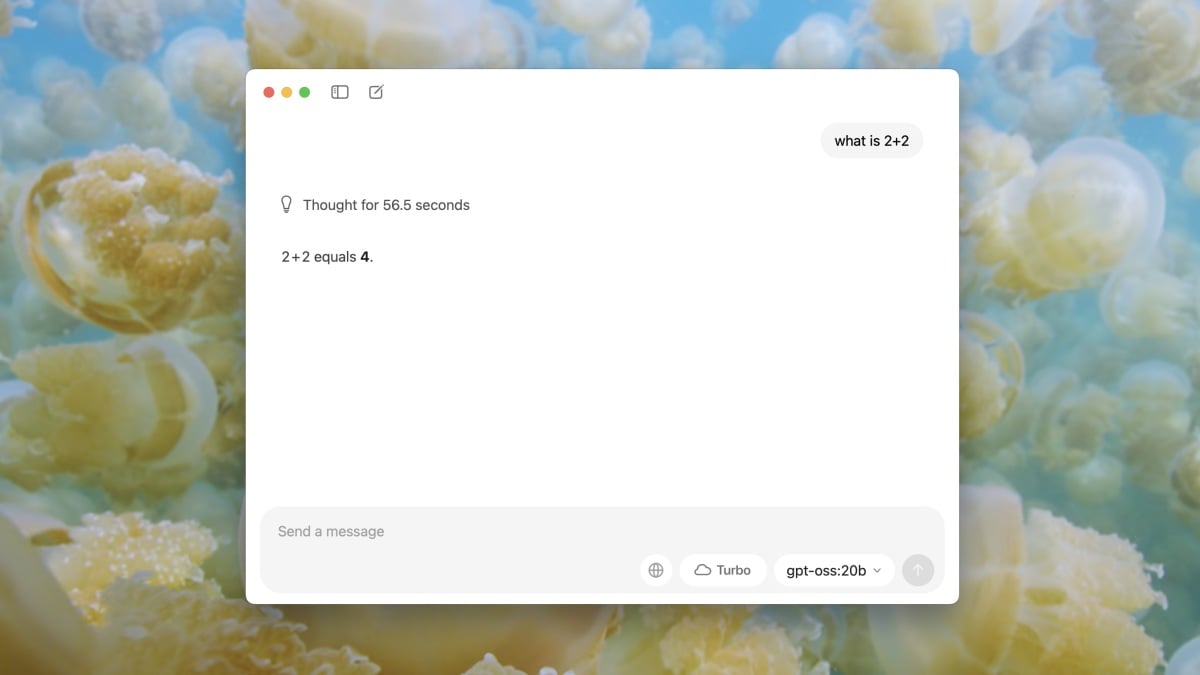
I started with a simple one: “what is 2+2?” After hitting return on both keywords, I saw chat bubbles processing the request, as if Ollama was typing. I could also see that the memory of both of my machines were being pushed to the max.
Ollama on my MacBook thought about the request for 5.9 seconds, writing “The user asks: ‘what is 2+2’. It’s a simple arithmetic question. The answer is 4. Should answer simply. No further elaboration needed, but might respond politely. No need for additional context.” It then answered the question. The entire process took about 12 seconds. My iMac, on the other hand, thought for nearly 60 seconds, writing: “The user asks: ‘what is 2+2’. It’s a simple arithmetic question. The answer is 4. Should answer simply. No further elaboration needed, but might respond politely. No need for additional context.” It took about 90 seconds in total after answering the question. That’s a long time to find out the answer to 2+2.
Next, I tried something I had seen GPT-5 struggling with: “how many bs in blueberry?” Once again, my MacBook started generating an answer much faster than my iMac, which isn’t unexpected. While still slow, it was coming up with text at a reasonable rate, while my iMac was struggling to get each word out. It took my MacBook roughly 90 seconds in total, while my iMac took roughly 4 minutes and 10 seconds. Both programs were able to correctly answer that there are, indeed, two bs in blueberry.
Finally, I asked both who the first king of England was. I am admittedly not familiar with this part of English history, so I assumed this would be a simple answer. But apparently it’s a complicated one, so it really got the model thinking. My MacBook Pro took two minutes to fully answer the question—it’s either Æthelstan or Alfred the Great, depending on who you ask—while my iMac took a whopping 10 minutes. To be fair, it took extra time to name kings of other kingdoms before England had unified under one flag. Points for added effort.
What do you think so far?
gpt-oss compared to ChatGPT
It’s evident from these three simple tests that my MacBook’s M3 Pro chip and additional 2GB of RAM crushed my iMac’s M1 chip with 16GB of RAM. But that shouldn’t give the MacBook Pro too much credit. Some of these answers are still painfully slow, especially when compared to the full ChatGPT experience. Here’s what happened when I plugged these same three queries into my ChatGPT app, which is now running GPT-5.
When asked “what is 2+2,” ChatGPT answered almost instantly.

When asked “how many bs in blueberry,” ChatGPT answered in around 10 seconds. (It seems OpenAI has fixed GPT-5’s issue here.)
When asked “who was the first king of England,” ChatGPT answered in about 6 seconds.
It took the bot longer to think through the blueberry question than it did to consider the complex history of the royal family of England.
I’m probably not going to use gpt-oss much
I’m not someone who uses ChatGPT all that much in my daily life, so maybe I’m not the best test subject for this experience. But even if I was an avid LLM user, gpt-oss runs too slow on my personal hardware for me to ever consider using it full-time.
Compared to my iMac, gpt-oss on my MacBook Pro feels fast. But compared to the ChatGPT app, gpt-oss crawls. There’s really only one area where gpt-oss shines above the full ChatGPT experience: privacy. I can’t help but appreciate that, even though it’s slow, none of my queries are being sent to OpenAI, or anyone for that matter. All the processing happens locally on my Mac, so I can rest assured anything I use the bot for remains private.
That in and of itself might be a good reason to turn to Ollama on my MacBook Pro any time I feel the inkling to use AI. I really don’t think I can bother with it on my iMac, except for perhaps reliving the experience of using the internet in the ’90s. But if your personal machine is quite powerful—say, a Mac with a Pro or Max chip and 32GB of RAM or more—this might be the best of both worlds. I’d love to see how gpt-oss-20b scales on that type of hardware. For now, I’ll have to deal with slow and private.
Disclosure: Ziff Davis, Lifehacker’s parent company, in April filed a lawsuit against OpenAI, alleging it infringed Ziff Davis copyrights in training and operating its AI systems.