
Close Menu

    Subscribe to Updates

    Get the latest creative news from FooBar about art, design and business.

    What's Hot

    How to Send Wine as a Gift: Shipping Rules and Tips

    October 18, 2026

    Scaling a Company Forces Founders to Make 3 Key Shifts

    October 18, 2026

    CredentialCamp – Company Profile – AllBusiness.com

    October 18, 2026
    Facebook X (Twitter) Instagram
    Trending
    • How to Send Wine as a Gift: Shipping Rules and Tips
    • Scaling a Company Forces Founders to Make 3 Key Shifts
    • CredentialCamp – Company Profile – AllBusiness.com
    • Rahul Yadav new Chief Experience Officer at Fazlani Nature’s Nest
    • What’s the Right Level of Interest Rates For the Economy?
    • White House Reporters Spill The Beans On How Trump Privately Spoke Of Katie Zacharia
    • Trump Threatens California Officials With Imprisonment Over Stance On Mail Ballots
    • The Samsung Galaxy Watch Ultra Is Over $175 Off Right Now
    Facebook X (Twitter)
    SBM Global News
    Demo
    • Home
    • Top Stories
      • Politics
    • Business
      • Small Business
      • Marketing
    • Finance
      • Investment
    • Technology

      CredentialCamp – Company Profile – AllBusiness.com

      October 18, 2026
      Read More

      Ember’s new temperature-controlled mug makes my nightly tea ritual even better

      October 18, 2026
      Read More

      Clevra – Company Profile – AllBusiness.com

      October 17, 2026
      Read More

      Even Benchmark thinks AI is eroding the venture pact against backing rivals

      October 16, 2026
      Read More

      QuipAssist – Company Profile – AllBusiness.com

      October 15, 2026
      Read More
    • Lifestyle
      • Travel
    • Feel Good
    • Get In Touch
    SBM Global News
    Demo
    Home»Lifestyle»How to See All the Devices Logged in to Your Microsoft Account
    Lifestyle

    How to See All the Devices Logged in to Your Microsoft Account

    By Staff WriterApril 22, 20243 Mins Read
    Facebook Twitter LinkedIn Reddit Email
    #image_title
    Share
    Facebook Twitter LinkedIn Pinterest Email


    Here’s a straightforward security audit you can, and should, perform periodically: Check all of the devices currently logged into your Microsoft account. If you’ve jumped between a lot of computers since you first registered your account, it might be active in more places than you think.

    Not only will this alert you to unwelcome visitors who might have gained access to your account through nefarious means, it’ll also flag up older devices that you’re no longer using but you’re still logged in to—whether it’s the Xbox you sold on eBay or the laptop you gave to your nephew.

    Whatever the scenario, to keep your Microsoft account locked down and as well protected as possible, you should only connect it to devices you’re using regularly. If there are devices in the list that you don’t recognize or no longer use, you can remove them remotely with a couple of clicks.

    It’s worth doing this for all of your other digital accounts to—see these Lifehacker posts with information on how to do this for your Apple, Google, and Netflix accounts too, for example.

    How to see all the devices using your Microsoft account

    To see all the devices using your Microsoft account, you’ll need to do so on the web via your Microsoft account page (there’s currently no way to do it from inside Windows). The landing page shows all the information associated with your Microsoft profile, including your name and the part of the world where you’re in, as well as any subscriptions you’re currently signed up to (such as Microsoft 365).

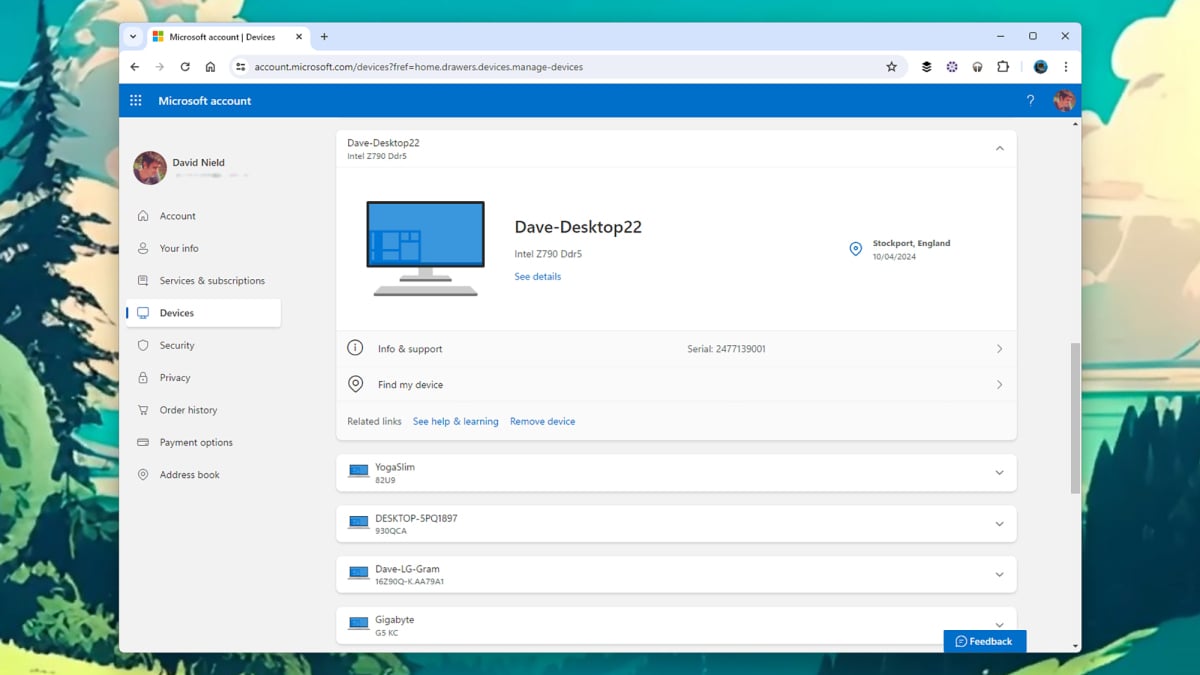
    To see everywhere where your Microsoft account is active, click Devices. The main pieces of hardware you’ll see on the list are Windows computers and tablets, plus any Xbox consoles you’re logged into. Further down the page, you’ll see a link for to check which Android and iOS devices your Microsoft account is connected to.

    Select any device in the list to see more information about it. What’s provided will vary, but might include the device specs, when you registered your Microsoft account with it, and any applicable warranty details. With some devices, you’ll be able to locate where they are on a map by clicking Find my device.

    Remove unauthorized devices from your Microsoft account

    You can use the information provided to help spot suspicious activity—you should be able to see when the device was last accessed, for example. Click Remove this device to disconnect a device from your Microsoft account, and err on the side of caution too: You can always sign in again if you disconnect a piece of hardware you still need.

    While you’re here, it’s worth opening up the Security tab and reviewing how you sign into your Microsoft account. Follow the Manage how I sign in link to set up extra precautions such as two-step verification or password-free account access, which make it more difficult for anyone other than you to sign into your Microsoft account.


    View original article here

    Share. Facebook Twitter LinkedIn Email Reddit
    Previous ArticleSurprising Signs Of Seasonal Allergies Beyond Sneezing
    Next Article Dismissed Trump Jurors Describe Intense Days in a Glaring Spotlight

    Related Posts

    How to Send Wine as a Gift: Shipping Rules and Tips

    October 18, 2026
    Read More

    The Samsung Galaxy Watch Ultra Is Over $175 Off Right Now

    October 18, 2026
    Read More

    Does Stove Top Stuffing Go Bad or Expire? Full Storage Guide

    October 16, 2026
    Read More
    Add A Comment

    Leave A Reply Cancel Reply

    Demo
    Top Posts

    Former FBI, CIA Head Has ‘Serious Concerns’ With Trump Cabinet Picks

    December 28, 2024435

    Emirates to operate next-gen A350 on the third daily service to Cape Town

    January 14, 2026256

    AAVE Price Prediction: Target $215-225 by Mid-January 2025 as Technical Indicators Signal Bullish Momentum

    December 15, 2025240

    Wall Street Slumps As Alphabet, Qualcomm And Other Tech Stocks Fall

    February 7, 2026212
    Don't Miss
    Lifestyle

    How to Send Wine as a Gift: Shipping Rules and Tips

    By Staff WriterOctober 18, 202610 Mins Read

    The easiest way to send wine as a gift is to order from a licensed…

    Read More

    Scaling a Company Forces Founders to Make 3 Key Shifts

    October 18, 2026

    CredentialCamp – Company Profile – AllBusiness.com

    October 18, 2026

    Rahul Yadav new Chief Experience Officer at Fazlani Nature’s Nest

    October 18, 2026
    Stay In Touch
    • Facebook
    • Twitter
    Demo
    Find More
    Trending News
    • How to Send Wine as a Gift: Shipping Rules and Tips
    • Scaling a Company Forces Founders to Make 3 Key Shifts
    • CredentialCamp – Company Profile – AllBusiness.com
    • Rahul Yadav new Chief Experience Officer at Fazlani Nature’s Nest
    • What’s the Right Level of Interest Rates For the Economy?
    • White House Reporters Spill The Beans On How Trump Privately Spoke Of Katie Zacharia
    • Trump Threatens California Officials With Imprisonment Over Stance On Mail Ballots
    • The Samsung Galaxy Watch Ultra Is Over $175 Off Right Now
    • The marketing automation model that drove 9x qualified lead growth in a secondary market
    • Ember’s new temperature-controlled mug makes my nightly tea ritual even better
    Other News
    • Business
    • Feel Good
    • Finance
    • Fitness
    • Health
    • Investment
    • Lifestyle
    • Marketing
    • Politics
    • Small Business
    • Technology
    • Top Stories
    • Travel
    About Us

    Small Business Minder brings together business and related news from around the world in one place. Follow us for all the business news you'll need.

    Facebook X (Twitter)
    Our Picks

    How to Send Wine as a Gift: Shipping Rules and Tips

    October 18, 2026

    Scaling a Company Forces Founders to Make 3 Key Shifts

    October 18, 2026
    Most Popular

    Former FBI, CIA Head Has ‘Serious Concerns’ With Trump Cabinet Picks

    December 28, 2024435

    Emirates to operate next-gen A350 on the third daily service to Cape Town

    January 14, 2026256
    Categories
    © 2026 Small Business Minder
    • Home
    • Get In Touch

    Type above and press Enter to search. Press Esc to cancel.

    Ad Blocker Enabled!
    Ad Blocker Enabled!
    Our website is made possible by displaying online advertisements to our visitors. To get the most from our site, please disable your Ad Blocker.