
There are many things about network connectivity that the average user doesn’t know about or pay attention to, and one of them is their default gateway.
A default gateway is what ensures your devices and transmissions can communicate with and reach their respective destinations, especially when these endpoints are outside of your network. Although a default gateway works in the background, understanding how it functions is vital to diagnosing and troubleshooting network issues.
Here are the six things you need to know about a default gateway.
1. What a Default Gateway Does
A default gateway is a router, device, or network node that functions as a forwarding host so that data packets can reach their destination. In other words, it’s the intermediary between the systems on your local network area (LAN) and the internet.
When your computer or smartphone sends a request to a remote host, the default gateway helps ensure the information is routed correctly. The default gateway also represents the path devices will pass information through when the destination is unknown.
A default gateway simplifies internet connectivity by consolidating it on one device, most commonly for personal and home networks. As for enterprises, they typically combine the function of a gateway node to act as a firewall and proxy server.
As a device, a gateway’s role is to connect different networks together, which it does by providing a “default” path to follow. As a node on your computer network, a default gateway acts as an intermediary, making it possible for your device to communicate with separate networks outside of your LAN.
To enable network communication or a shared subnet between multiple devices, your default gateway uses an internal IP address. Meanwhile, the default gateway also allows your computing devices to reach hosts outside their own subnets.
Altogether, a default gateway helps your computing devices communicate with different networks and transmission protocols—such as VoIP (Voice over Internet Protocol) communications with encrypted VoIP security mechanisms.
Ultimately, since your default gateway acts as an entry and exit point for data on your network, this means all data must pass through it at least once—except for those flowing within the nodes of the same LAN segments.
Default gateway examples
A default gateway node or device can take several forms. However, when it comes to virtual networks, the type of default gateway is determined by the network configuration of your virtual machine (VM).
Some other examples of default gateways include the following:
- Home office—A router is the most common default gateway used in residential and home networks, especially for wireless connections. A firewall feature typically strengthens these routers for better network security.
- Web application firewalls (WAF)—As an application gateway, a WAF filters and blocks traffic it deems potentially harmful to servers and web applications.
- Internal networks—Most prevalent in corporate environments, an internal network is used to coordinate multiple servers and their respective subnets.
- Websites—When a user requests a web page or cloud service from their device, default gateways handle the tasks of routing the request to the correct server and processing it on the receiving end.
- VoIP trunk gateways—This gateway type allows organizations to interface with their copper-based landline systems on a VoIP network successfully. It ultimately helps to avoid network latency, jitter, and other issues that may degrade phone call quality.
2. How To Find Your Default Gateway IP Address
Your default gateway’s IP address is typically the same as the private IP address of your router. But the bigger question is why you would want to know the IP address of your default gateway.
The most vital reason is for troubleshooting purposes, as its IP address can assist you in identifying and resolving network problems. Moreover, knowing your default gateway’s IP address is often indispensable when changing or configuring your router settings on its website setup page.

Your default gateway’s IP address is also handy when you want to switch routers, so knowing it can help you overcome IP address conflicts with other devices on your network.
Likewise, it’s good to know your gateway’s IP address for security reasons as well. For instance, you can personalize your default gateway’s IP address to make it difficult for cybercriminals to compromise your security by guessing your router’s access point.
Depending on your device and operating system, you can find your default gateway IP address in several ways.
The following is a summary of how to find it via system preferences on a Windows PC machine. Keep in mind that the steps may differ based on operating system versions.
- Open your Windows Start Menu or search box.
- From Settings or Control Panel, click on the Network and Internet category.
- Locate and click on Advanced Network Settings.
- Select Network and Sharing Center, and you should find the default gateway as IPv4 or IPv6 address.
As an alternative, more advanced users can achieve the same result via the command line using powerful utilities such as the command prompt or powershell.
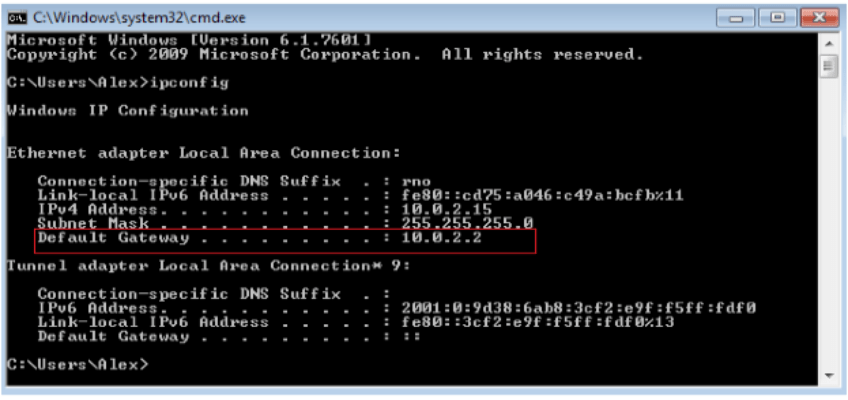
- On your Windows command prompt, type ipconfig (which stands for Internet Protocol Configuration) to display your network information.
- Scroll until you see a Default Gateway entry under the Ethernet Adapter Local Area Connection section with your router’s IP address beside it.

Here’s a summary of how to find your default gateway on Linux systems:
- On your computer’s bash or command prompt, type ifconfig.
- If you are having trouble or the system generates errors, try running ifconfig as sudo or root user. For example, by typing sudo ifconfig.
For macOS users, follow these steps:
- Open the Apple menu and click on System Preferences.
- Click on Network on the left top bar menu.
- Select the network you’re connected to and click on Details.
- From there, open the TCP/IP tab to discover the default gateway IP address next to the Router section.
Alternatively, you can launch a terminal app and type this command: route get default | grep gateway.
3. How To Configure a Default Gateway
To set a default gateway on a computing device, you first need to obtain it using the methods listed in the last section (or any other functional method). Once you have the IP address, manually enter it in your device’s Network preferences (for Mac and Linux) or TCP/IPv4 settings (for Windows).
Once you have done this, the default gateway becomes statically assigned.
4. What Is the Difference Between a Gateway and a Router?
It’s tough to avoid mentioning a router while talking about default gateways and their functions—particularly when a default gateway’s IP address can be the same as the router’s.
A router is typically considered a type of gateway. In fact, routers are often regarded as the most common type of gateway, especially in residential settings.
However, while gateways and routers share some similarities, they aren’t the same. The primary difference is that a router’s role is connecting two similar network types, while a default gateway joins dissimilar networks.
5. Why Is the Default Router IP Address (192.168.1.1) Important to Know?
The number 192.168.1.1 is significant as an IP address because many routers and modems use it. One of the reasons is that it is part of the IPv4 range reserved for private networks, which means it’s not reachable by the internet.
Knowing this IP address is also important because it allows you to access your router’s settings and configurations. Its convenience makes it easy for you to change and manage network settings whenever you want.
If necessary, you can change it to avoid conflicts with other devices and hosts on your network.
6. What Information Can a Default Gateway Tell You that Might Help with Connectivity, Networking, or VPN Issues?
A default gateway can help save you from a big ol’ deluge of network connectivity issues, particularly when its role is that of a router connecting a host to remote network segments.
- Networking issues—A default gateway provides vital network services when a host or device doesn’t know its network destination. This helps most systems avert problems by helping the host identify the network the destination is in.
- DNS servers—If you use a default gateway VPN and have trouble loading websites, a default gateway can inform you which DNS servers your connection uses and if there’s an error.
- Protecting online safety—By providing an exit point for packets, default gateways can help filter unauthorized traffic to strengthen network security.
- Maintaining effective communication between devices—A default gateway helps to ensure stable communication so that devices on a local network can interact with each other and access web server resources more reliably.